AI (Artificial Intelligence) GUIDELINES FOR LWRDPC PHOTOGRAPHY COMPETITIONS
Images must originate as photographs captured by the entrant. Standard editing is allowed, including AI-assisted tools that do not generate or otherwise add new content to the image. No portion of any image may include AI-generated content, stock images, clipart, or any other third-party content. The club may request original files for verification.
Quick decision test
- Did you capture it with your camera?
- Did software generate content (new objects/sky/background)? NOT ALLOWED
- Did software only enhance your pixels (denoise/sharpen/color)? ALLOWED
PROHIBITED - NOT ALLOWED
AI-Generated Content
- No generative AI tools (Midjourney, DALL-E, Stable Diffusion, Bing Image Creator, Leonardo AI, Firefly, NanoBanana, ChatGPT)
- Generative Fill / Generative Expand that creates NEW background, skies, birds, people, buildings, etc. objects (Photoshop, Lightroom)
- OK: Using Gen Fill to expand a background. Gen Fill will analyze the nearby existing background and, using AI learning, generate new pixels to create an expanded background that simply matches the existing background.
- NOT OK: Using Gen Fill to expand the background with a text prompt “add palm tree to enhance compositional framing”. Gen Fill will analyze the nearby existing background and, using AI learning, will generate new pixels for the background AND generate new pixels for a palm tree.
- No AI-generated sky, background, or object replacements
- No text-to-image generation
Third-Party Content
- No stock photography or stock image elements
- No clip art
- No images or elements photographed by others
- All photographic elements must be captured by the entrant
PERMITTED - ALLOWED
AI-Assisted Processing Tools
- Noise Reduction: Topaz DeNoise, Adobe Denoise, Luminar, DxO, Topaz Photo AI
- Sharpening: Topaz Sharpen, Adobe Smart Sharpen
- Selection Tools: AI-powered selections and masking
- Auto-Adjustments: Auto exposure, contrast, color balance
- Spot Removal: Dust spots, sensor spots, minor distractions, including people, objects
Traditional Processing
- Cropping, exposure, contrast, saturation, color grading
- Dodging and burning
- HDR from your own brackets
- Focus stacking from your own images
- Panorama stitching from your own images
- Composites using only your own photographs (Open/Creative categories)
- Textures and overlays
Composites
- Multiple exposures are allowed only if all image content comes from the maker’s own photographs.
- No third-party stock elements.
- No AI-generated elements.
HELPFUL CLARIFICATIONS:
Q: What's the difference between AI-assisted and AI-generated?
A: AI-assisted enhances YOUR photograph (denoise, sharpen). AI-generated creates new content (objects) that didn't exist in your capture.
Q: Can I use Lightroom's new AI features?
A: Yes, if they enhance your photo. No, if they add new content.
Q: Can I use Photoshop's Content-Aware Fill?
A: Yes, for Open/Creative categories to remove small distractions. No for Photojournalism. The key is it must not add significant new content or alter the truth of the scene.
Q: What about smartphone computational photography?
A: Allowed if captured in standard photo mode. Not allowed if using AI modes that generate significant content in the image.
Q: Can I composite multiple of my own photos?
A: Yes, in Open/Creative categories, as long as ALL elements are from your own photographs.
| |
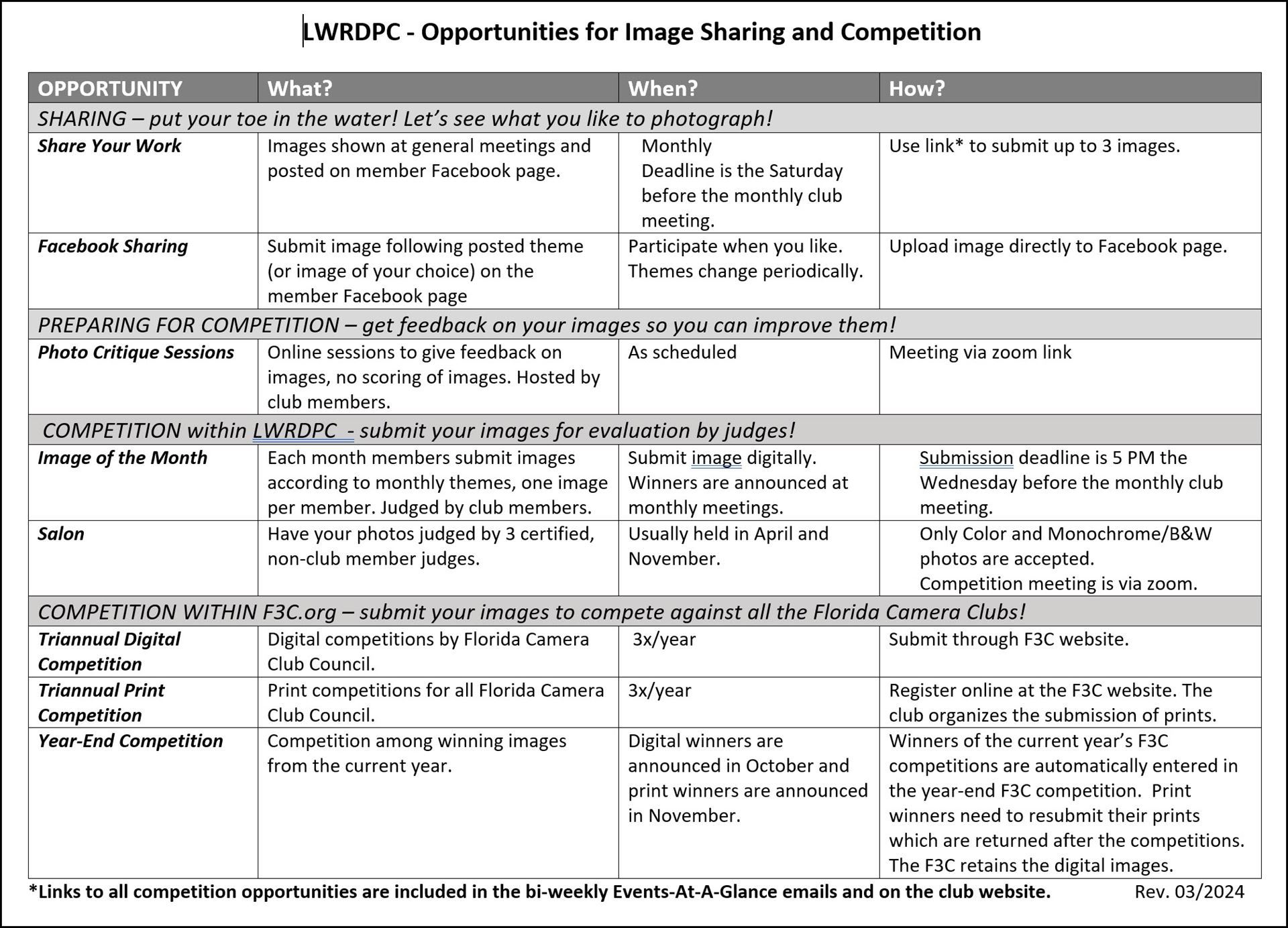
The Digital Image of the Month competition is held monthly at our general meetings and is open to all current members. Each member may submit one (1) image per month. Images must be submitted digitally no later than 11:00 PM on the Wednesday prior to the monthly meeting. Monthly themes are published in advance and can be found here. Unless otherwise stated, all elements used to create an image must be photographed or created by the submitting photographer. Use of purchased or externally generated image components is not permitted.
Images are judged by three club members approved as qualified judges, using our competition software Pixoroo. Beginning January 2026, images are evaluated using a 100-point scoring system based on the following five judging criteria:
- Impact – The immediate visual and emotional response the image creates.
- Composition – Effective arrangement of visual elements, balance, and use of space.
- Technical – Proper exposure, focus, lighting, color, and overall technical execution.
- Theme – How well the image interprets and supports the monthly theme.
- Overall Impression – The image’s cohesiveness, creativity, and lasting appeal.
Awards will be given for First, Second, Third Place, and Honorable Mention. Judges’ comments and critiques are provided to support learning, growth, and continuous improvement.
This Fall, we're excited to introduce a change in our Salon Competition! This Salon has three categories, Color, Mono, and our new AI category, and each one has its own set of awards. Engraved trophies for first place in each category, ribbons for 1st, 2nd, and 3rd, and merit ribbons for the top finishers.
Salon Competitions
Our Salon Competition provides a unique learning opportunity by having your images evaluated by three qualified judges from outside our club. Each image is presented anonymously and moderated by our Competition Director in an evening Zoom presentation. Before the meeting, every image is reviewed by the judges. During the Salon, merit images are displayed while the judges share what worked well and, when appropriate, offer constructive suggestions to help the maker continue to grow as a photographer.
|